There
are conversion tools available for converting to and from PathAway
format databases. These tools are provided as Windows or Mac Desktop
PC programs, command-line batch programs, or Windows DLLs.
PC-Tools for Windows
PathAway PC-Tools for Windows includes:
-
Map Manager for converting maps of different formats for use in PathAway,
- Icon Manager for creating icons to be used as Point markers.
- Data Transfer Utility for converting data in formats such as GPX, KML, LOC, text delimited format etc.
The PC-Tools programs are included in the PathAway Full Installers for Windows Mobile and PalmOS, or Download PathAway PC-Tools as a separate Installer
Map Conversion Tools
PathAway Map Manager for Windows is included
in the regular install for PathAway (Palm OS, and Windows Mobile) or as a separate download as part of the PC-Tools for Windows. (see above).
Map Manager provides an easy to use Windows Interface for
converting maps. Unless you need to convert maps as a batch process,
or want to create maps from within your own application, the PathAway
Map Manager for Windows should fulfill your needs.
Download
PathAway Map Conversion Tools
(PWMapConvert.zip for Windows).
This is a zip file containing tools for converting maps to PathAway
format. The zip file contains the batch program, Windows DLL, and
instructions html page. See Instructions
for more detail.
Formats Supported:
Map:
Jpeg, BMP, PNG, GIF, TIFF, GeoTiff, BSP/KAP
Calibration Files:
TFW (WorldFile), JPR (Fugawi), CAL (Touratech/QuoVadis)
PathAway Track/Route/Point Conversion Tools
 |
PathAway
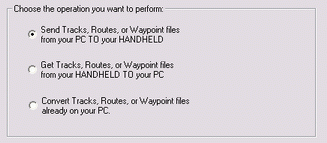
Data Transfer Utility: Windows wizard-style application
to convert tracks, routes, and points easily from and to PathAway
format. Easy transfer to your handheld.
Supports GPX, LOC, Google KML, OZI Explorer data files, Fugawi Data Files,Waypoint+,
and customizable tabbed or delimited text format.
|
|
Download
PathAway Database Conversion Tools
(PWDBConvert.zip for Windows).
This is a zip file containing tools for converting points, tracks
and routes to and from PathAway format. The zip file contains
the batch program, Windows DLL, and instructions html page.
Formats Supported: GPX, LOC, Google KML, OZI Explorer data files, Fugawi Data Files,Waypoint+,
and customizable tabbed or CSV delimited text format,
Garmin Waypoint format. Field position and type can be set. See
Instructions
for more detail
|

 PathAway
GPS 5
PathAway
GPS 5 PathAway
GPS 5
PathAway
GPS 5 PathAway
GPS 5
PathAway
GPS 5 PathAway
GPS 5
PathAway
GPS 5 PathAway
GPS 4
PathAway
GPS 4